AI TOOL / #03900
AiAsk Summary
A Chrome extension tool that extracts article outlines to improve reading and research efficiency.
Introduction
Chrome extension that extracts outlines from articles for enhanced reading and research.
What is the AiAsk Summary AI Chrome extension/plugin?
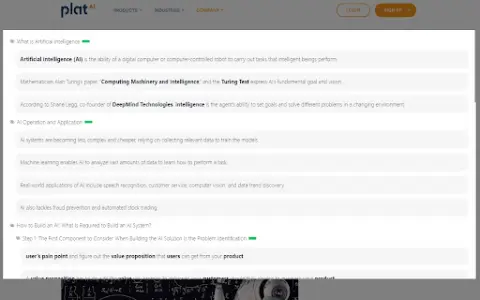
AiAsk Summary is a Chrome extension designed to enhance your reading and research experience. It cleverly extracts the main outline of any article you browse, providing a structured overview of its content.
How do I use the AiAsk Summary AI Chrome extension/plugin?
1. Browse: Open any article in the Chrome browser.
2. Activate: Click the icon in the browser toolbar or the icon on the right side of the page.
3. Extract: This extension analyzes the article and displays a concise outline.
2. Activate: Click the icon in the browser toolbar or the icon on the right side of the page.
3. Extract: This extension analyzes the article and displays a concise outline.
Core features of the AiAsk Summary AI Chrome extension/plugin
Automatic outline generation
User-friendly interface
Improve reading efficiency
Supports YouTube videos
Show detailed content when the outline is ready.
User-friendly interface
Improve reading efficiency
Supports YouTube videos
Show detailed content when the outline is ready.
Related
The New GitBook
Provides a single, authoritative source for technical documentation, equipped with AI-driven search capabilities.
AI Brain Bank – Chat with ALL Your Data
An artificial intelligence platform designed for interacting with documents, media, and knowledge.
Easy English Vocabulary
An app that expands your English vocabulary through flashcards, AI, and personalized learning methods.
GPTURER
GPTURER scans websites to create knowledge datasets that can be used by ChatGPT assistants.
SmartSolve – AI Homework Solver
An AI tool designed to assist with assignments, quizzes, and tests.
Murfy
AI-powered native online LaTeX editor