AI TOOL / #04050
AI Roundtable
Ask a question and receive answers from multiple AI assistants.
Introduction
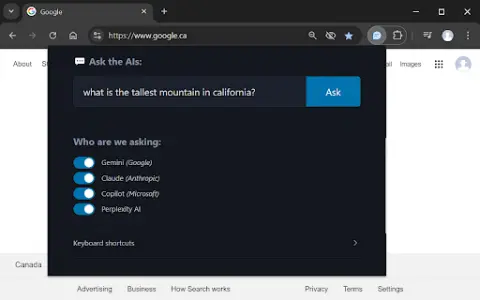
Ask one question, get answers from multiple AI assistants.
What is a Multiple AI Assistants Chrome extension/plug-in?
This website allows users to submit questions at once and receive answers from multiple AI assistants. Users can customize which assistant they want to use for their queries. The website also provides keyboard shortcuts, making it easy to access various functions quickly.
How to use the Multiple AI Assistants Chrome extension?
Use the shortcut keys Ctrl/Cmd + Shift + Q to open the query window and start typing your question. Use Alt + 1 to switch to Gemini, Alt + 2 to switch to Claude, Alt + 3 to switch to Copilot, and Alt + 4 to switch to ChatGPT.
The core functions of various AI Assistant extensions/plugins for Chrome.
Query multiple AI assistants simultaneously
It is possible to customize the selection of AI assistants.
Convenient and fast keyboard shortcuts
It is possible to customize the selection of AI assistants.
Convenient and fast keyboard shortcuts
Related
AI addition learning helper
AI Addition Learning Assistant – provides interactive charts and printable addition tables.
rKnown2Notion
Notion integration for automatically syncing knowledge bases and content from Understanding Reading.
DocsBot AI
Create a customized AI chatbot based on your documents and content.
ResearchPal
An award-winning AI-powered research assistant that significantly saves time and boosts productivity for students, researchers, and industry professionals.
Grade Calculator AI
Free online grade calculator for students, educators and parents.
Wave AI
Alan offers fast, straightforward, and transparent health insurance services, complemented by digital management systems and responsive customer support.