AI TOOL / #04208
Shift-Ctrl-F: Semantic Search for the Browser
A Chrome extension that uses MobileBERT to search for and highlight answers on web pages.
Introduction
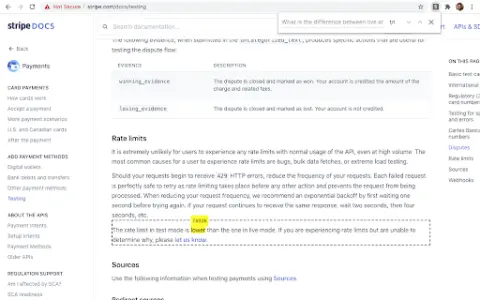
Chrome extension using MobileBERT to search and highlight answers on webpages.
What is the Shift-Ctrl-F Chrome extension/plugin?
Shift-Ctrl-F is a Chrome extension that utilizes the MobileBERT model, which has been fine-tuned using the SQuAD dataset. This extension uses TensorFlowJS to search for answers on web pages and identify relevant elements. It allows users to enter natural-language queries and find corresponding answers within the content of the current page.
How to use the Shift-Ctrl-F Chrome extension/plugin?
1) Open the extension pop-up window using the toolbar or shortcut key (Shift-Ctrl-F).
2) Enter your natural language query in the search box.
3) Press Enter and wait for the model to return the results.
The core functionality of the Shift-Ctrl-F Chrome extension/plug-in.
Conduct natural language question-and-answer interactions on web pages.
Highlight relevant elements based on the search query.
Efficient processing using MobileBERT
Highlight relevant elements based on the search query.
Efficient processing using MobileBERT
Related
TheoAssist
Resources for Bible study, preaching, teaching, and Q&A.
Wendy
Provide round-the-clock artificial intelligence-based mental health support for individuals and teams.
2 Weeks AI
An AI course for beginners, offering 14 simple, practical, hands-on lessons.
Praxy AI – ChatGPT On The Go For Students
AI-powered learning aids that transform the college experience
Immerse
An immersive language training platform for corporate teams, using AI and professional instructors.
Summarize and Translate with Gemini
Use Gemini AI to summarize and translate web pages with just one click.