AI TOOL / #05336
Legal Red Flag Detector
A Chrome extension that uses AI to identify potentially problematic elements in legal documents.
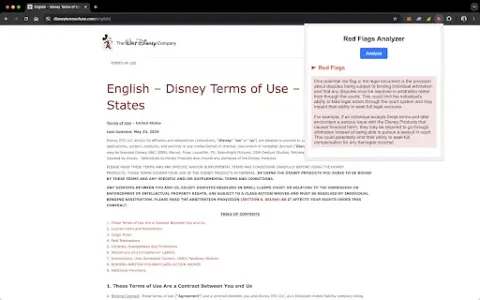
Introduction
Chrome extension that uses AI to detect red flags in legal documents.
What is the Legal RedFlag Detector AI Chrome extension/plug-in?
The Legal Red Flags Detector is a Chrome extension designed to identify potential red flags in legal documents, such as terms of service, privacy policies, and user agreements. It utilizes AI technology to highlight clauses that may be harmful to users and provides clear explanations, eliminating the need for legal expertise.
How to use the Legal RedFlag Detector AI Chrome extension/plug-in?
Install the extension, open the web page containing the legal document, and click “Analyze” in the pop-up window. This will display highlighted sections marked with red flags, along with simple explanations.
The core functionality of the Legal RedFlag Detector AI Chrome extension/plugin
Automatic analysis of legal documents
Prominent clauses regarding potential issues
A popular explanation of the red flag
Intuitive interface in the pop-up window
Prominent clauses regarding potential issues
A popular explanation of the red flag
Intuitive interface in the pop-up window
Related
Certidoes.ai
Automated extraction of business documents, utilizing artificial intelligence to provide analysis and additional information.
JudgeAI
JudgeAI utilizes artificial intelligence to automate judicial processes, ensuring that unbiased decisions are made in economic disputes.
ai platform
A generative AI platform that integrates machine learning with low-code/no-code application builders, suitable for a wide range of professionals.
Plais
Plais AI transforms interior photos into extraordinary designs, saving time and money.
vLex
vLex enhances online research with legal citations and AI-driven recommendations.
LocaleScan
LocaleScan provides comprehensive data to assist in making informed decisions regarding real estate.