AI TOOL / #06171
Patsa – AI-powered Meeting Copilot
A Chrome extension that enables real-time transcription and AI-powered Q&A during online meetings.
Introduction
Chrome extension for real-time transcription and AI-powered Q&A during online meetings.
What is the Patsa AI Chrome extension/plugin?
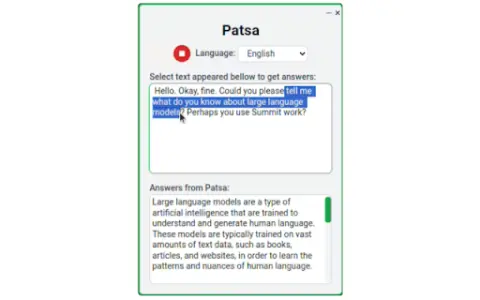
Patsa is a Chrome browser extension designed to enhance online meetings on platforms such as Google Meet, Zoom, and Teams. It transcribes other participants’ speech in real time and lets users select transcribed text to ask AI questions, providing instant information and answers.
How do I use the Patsa AI Chrome extension/plugin?
1) Launch the Patsa extension in any online meeting in Chrome. 2) Click the "Start Transcribing" button to transcribe what the other participants are saying. 3) Select the transcript text you want to ask the AI about, and you'll receive an instant response from the AI.
Core features of the Patsa AI Chrome extension/plugin
Real-time transcription of participants’ speech
AI Q&A based on transcribed text
AI Q&A based on transcribed text
Related
Transkriptor Transcribe Audio to Text
An AI-powered browser extension for speech-to-text conversion, enabling fast and secure transcription.
Twinning AI
Twinning AI: Create AI clones to chat with fans and generate profits.
Loro – Aprende nuevas palabras
Loro is a browser extension that enables seamless language learning through automatic word translation.
AI Teacha
AI Teacha utilizes AI technologies to empower educators, enabling efficient teaching and personalized learning.
SJinn
AI agents designed for the creation of images, videos, audio, and 3D content.
RambleFix
AI note-taking and writing tools that convert voice notes into high-quality text.