AI TOOL / #06218
Talk with GPT Extensions
A Chrome extension for conversing with OpenAI's GPT-3 via voice or text.
Introduction
Chrome extension for conversing with OpenAIs GPT-3 using voice or text.
What is the Talk-with-GPT AI Chrome extension/plugin?
Chat with GPT is a Chrome extension that allows users to converse with OpenAI's latest language model AI. It enables a natural and engaging chat experience through voice or text input. The extension leverages Chrome's speech synthesis and text recognition features to provide a seamless conversational experience with the AI.
How do I use the Talk-with-GPT AI Chrome extension/plugin?
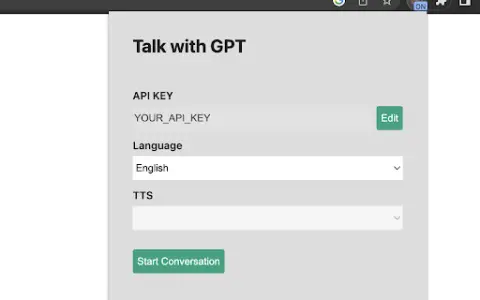
1. Get an OpenAI API key. 2. Open the extension popup. 3. Register the API key. 4. Select a language if needed. 5. Click the “Start Conversation” button. 6. In the pop-up window, click the “Click to Speak” button to start the conversation.
Core features of the Talk-with-GPT AI Chrome extension/plugin
Voice and text conversations with GPT-3
Using Chrome's speech synthesis and text recognition
A simple and intuitive user interface
Using Chrome's speech synthesis and text recognition
A simple and intuitive user interface
Related
Rafiki
Record, transcribe, summarize, and analyze online meetings.
Talki Guru
AI platforms generate animated avatars along with synchronized mouth-motion videos, using static images and text as input.
Web Whisper
Web Whisper converts web pages into audio, making them easy to listen to like a podcast.
ai celebrity voice clone
AI-powered celebrity voice cloning lets you enjoy instant voice experiences right in your browser.
NewWord
AI-powered multilingual vocabulary notebook for efficient language learning and word organization.
Text to Speech (TTS) Read Aloud Voice Reader by Audeus
A text-to-speech app with realistic sounds to boost productivity.