AI TOOL / #07462
Vision AI
A Chrome extension that enables AI-driven insights based on screenshot data.
Introduction
Chrome extension for AI-powered insights from screenshots.
What is a Vision AI Chrome extension/plug-in?
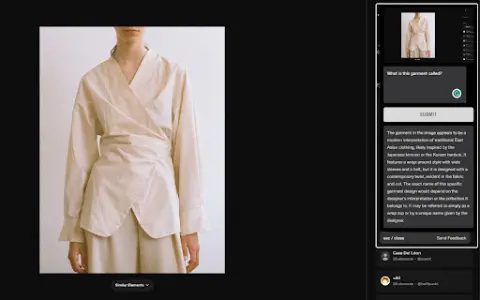
Visual AI is a Chrome extension that combines screenshot functionality with AI-driven insights to enhance online information search. It allows users to capture any portion of a web page, add notes or questions, and receive AI-generated responses based on the context of the captured image.
How to use the Vision AI Chrome extension/plug-in?
Install the Visual AI Chrome extension. Use CTRL + SHIFT + Y to take a screenshot, and then add any notes or questions you have. Visual AI will analyze the screenshot and provide an AI-generated response.
The core functions of the Vision AI Chrome extension/plugin
Screenshot capture
Interactive AI Suggestions
Seamless browser integration
Suitable for a wide range of applications in various fields
Privacy and Security
Interactive AI Suggestions
Seamless browser integration
Suitable for a wide range of applications in various fields
Privacy and Security
Related
Innovatiana
Ethical data annotation outsourcing services focused on quality and impact.
The Cognity
An AI platform for learning social skills for people with autism and their therapists.
wizart.ai
Provide AI-driven product visualization tools for the home decoration industry.
CalendarScan
The calendar scanner uses artificial intelligence to directly import calendars and events into your phone.
Merlin Bird ID
Applications that use photographs, audio recordings, and location data for the identification of birds.
InspektorAI
InspektorAI enhances online interactions through AI-powered web searches and visual content analysis.