AI TOOL / #08846
Copy for Chat GPT
An extension used to copy ChatGPT responses and check for plagiarism.
Introduction
Extension to copy ChatGPT responses and check for plagiarism.
What is the Plagiarism Detector Extension for Chrome – an extension/plug-in for Google Chrome?
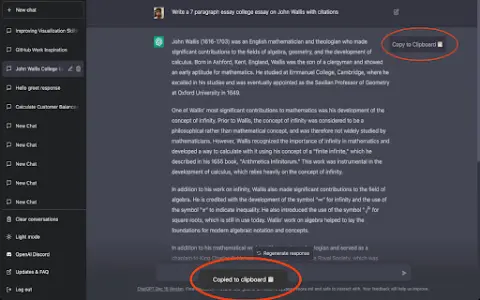
This extension allows you to copy the responses generated by ChatGPT by clicking a button or using the CMD+K shortcut key, and then have those responses checked by plagiarism detection tools.
How to use the Plagiarism Detector Extension for Chrome?
You can use this extension by clicking the copy button on ChatGPT’s response or by pressing CMD+K. The copied text will be automatically checked to determine whether it contains any plagiarized content.
The core functionality of the Plagiarism Detector Extension for Chrome.
One-click to copy the response from ChatGPT
Use the CMD+K shortcut key to copy.
Automatic plagiarism detection
Use the CMD+K shortcut key to copy.
Automatic plagiarism detection
Related
AI-Spy
Ai-SPY detects whether audio was generated by a human or by artificial intelligence.
WasteAID
Cloud-based AI waste management, audit, and compliance software provided by Ecorithms.
FallacyFilter: Bias & Fallacy Detector
An AI Chrome extension designed to detect biases and errors in online text.
Insert, Dont Paste
A Chrome extension that allows you to insert text from the clipboard into input fields, thereby bypassing any restrictions on pasting content.
Resemble
An AI voice generator with voice cloning capabilities, used for text-to-speech and voice-to-voice conversions.
paperred.com
Free plagiarism checking tool with artificial intelligence detection and rewriting capabilities.