AI TOOL / #06524
Speak based on Azure Speech
Text-to-speech extension using Azure Speech with support for multiple languages and Chrome live subtitles.
Introduction
Text-to-speech extension using Azure Speech, supports many languages and Chrome Live Caption.
What is Azure Speech TTS Extension ai chrome extension/plugin?
This is a text-to-speech (TTS) extension that leverages the Azure Speech service to convert selected text to audio. It supports multiple languages and integrates with Chrome's Live Subtitles feature for enhanced accessibility. Users need to configure the extension using their Azure Speech Service API key to enable TTS functionality.
How to use Azure Speech TTS Extension ai chrome extension/plugin?
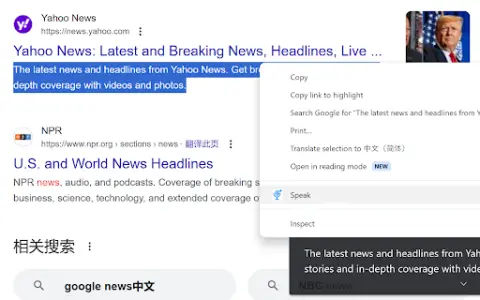
Install the extension, configure it with your Azure Speech Service API key, select text on a web page, and use the extension to play audio for the selected text. Audio playback will be based on the selected language and voice settings.
Core features of Azure Speech TTS Extension ai chrome extension/plugin
Text-to-speech using Azure Speech Service
Support multiple languages
Integrate with Chrome Live Subtitles
Configurable voice settings
Support multiple languages
Integrate with Chrome Live Subtitles
Configurable voice settings
Related
Eyre: Whiteboard Your Meetings
A secure conference platform based on EU standards, equipped with artificial intelligence tools and robust privacy protection features.
Voicv – Voice Cloning
AI-based voice cloning, text-to-speech and speech-to-text platform.
Lip
Lip syncs your mouth movements in videos to make it look like you're speaking another language.
syncwords.com
An all-in-one platform offering AI-powered automatic subtitling, dubbing, and translation services, with support for over 100 languages.
AutoPod
An Adobe Premiere Pro plugin for automatic video podcast editing.
Audionotes Pro
AI note-taking tools convert speech, text, and video into structured summaries and content.