AI TOOL / #06688
Vocha | Voice for ChatGPT
Vocha is a voice input extension specifically designed for ChatGPT, with an emphasis on privacy and ease of use.
Introduction
Vocha is a voice-typing extension for ChatGPT with a focus on privacy and ease of use.
What is the Vocha AI Chrome extension/plug-in?
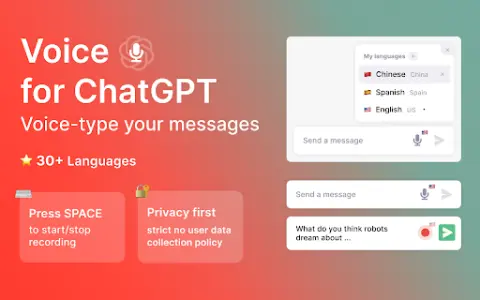
Vocha is a browser extension that allows users to input messages for ChatGPT via voice. It adds a microphone button to the message input field, which can be activated by using the SPACE key or by clicking on it. Vocha places great emphasis on user privacy, strictly adheres to policies that prohibit the collection of user data, and features a clean, minimalist design that ensures seamless integration with the ChatGPT interface.
How to use the Vocha AI Chrome extension/plug-in?
After installing the Vocha extension, a microphone button will appear in the ChatGPT message input box. You can press the SPACE shortcut key or click the microphone button to start and stop recording. You can change the language used for speech recognition by clicking on the flag icon. Remember to grant the microphone access permission during the installation process.
The core functions of the Vocha for Chrome extension/plugin
Provide voice input for messages sent via ChatGPT.
The SPACE shortcut key is used to start/stop recording.
Supports multiple languages (over 30 different languages).
Message editing options (send, edit, or continue recording)
The SPACE shortcut key is used to start/stop recording.
Supports multiple languages (over 30 different languages).
Message editing options (send, edit, or continue recording)
Related
Celebrity Voice Changer
Use the microphone to instantly transform your voice into that of any famous celebrity.
Hallo – AI Language Learning
An AI-based language learning and assessment platform that offers AI-assisted tutoring as well as assessment services for over 60 different languages.
Minutes: AI Meeting Notes & Transcripts
AI-powered meeting note-taking and transcription tools.
Audiotext AI
Audiotext AI converts audio to text, removes filler words, and offers multiple transcription styles.
Talki Guru
AI platforms generate animated avatars along with synchronized mouth-motion videos, using static images and text as input.
Lecture Notes AI
An AI-powered app that records lectures and generates summaries to improve note-taking.