AI TOOL / #07222
ReadImage
Extract, edit, and copy text from images on web pages.
Introduction
Extracts, edits, and copies text from images on web pages.
What is Image Text Extractor ai chrome extension/plugin?
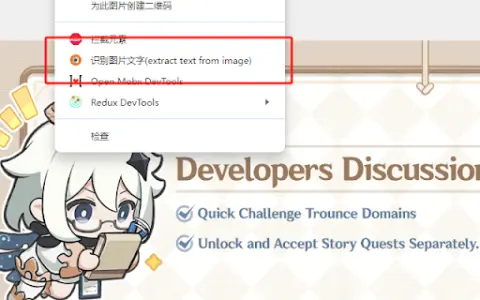
This extension allows users to extract text from images displayed on web pages. It supports common image formats such as jpg, jpeg, png and bmp. After extraction, the text can be edited and copied.
How to use Image Text Extractor ai chrome extension/plugin?
Hover your mouse over the image, right-click and select "Extract text from image". Press "Ctrl + Q" to view the extracted text on the extension page, where it can be edited and copied.
Image Text Extractor ai chrome extension/plugin core features
Extract text from images on web pages
Edit extracted text
Copy extracted text
Edit extracted text
Copy extracted text
Related
Reverse image search by Copyseeker
Copyseeker image search offers advanced image-search capabilities with just a simple right-click operation.
LensQuery
Model-agnostic AI chat app with image analysis and engaging AI conversations.
FastAccess Face Recognition Web Login
A Chrome extension that enables secure website login via facial recognition.
Aestractor – Your AI Gallery
An app that uses AI to identify beautiful photos in your album.
PlaylistGPT
An AI-driven tool for creating Spotify playlists based on concert posters.
fpt.ai
A comprehensive AI platform for business transformation.